Sunday, April 10, 2016

Wednesday, April 6, 2016
X++ Code for Creating New Customer and also update Address of the customer
X++ Code for Creating New Customer and also update Address of the
customer
static void
SK_CreateCustomerandupdateCustomerAddres(Args _args)
{
CustTable
custTable;
AccountNum
accountNum = 'ABC-123';
CustGroupId
custGroupId = '10';
Name
name = 'ABC';
DirParty
dirParty;
DirPartyPostalAddressView
dirPartyPostalAddressView;
custTable =
CustTable::find(accountNum);
if(!custTable) // if customer not exits
{
ttsBegin;
custTable.clear();
custTable.initValue();
custTable.AccountNum = accountNum;
custTable.CustGroup = custGroupId;
custTable.insert(DirPartyType::Organization, name);
dirParty = DirParty::constructFromCommon(custTable);
dirPartyPostalAddressView.LocationName = 'ABC-AUTO';
dirPartyPostalAddressView.City = 'London';
dirPartyPostalAddressView.Street = 'Dover
Street';
dirPartyPostalAddressView.StreetNumber = '123';
dirPartyPostalAddressView.CountryRegionId = 'GBR';
dirParty.createOrUpdatePostalAddress(dirPartyPostalAddressView);
ttsCommit;
}
else // if customer exits
updates the address of the customer
{
ttsBegin;
dirParty = DirParty::constructFromCommon(custTable);
dirPartyPostalAddressView.LocationName = 'ABC-AUTO';
dirPartyPostalAddressView.City =
'Germany';
dirPartyPostalAddressView.Street = 'Germany
Street';
dirPartyPostalAddressView.StreetNumber = '123';
dirPartyPostalAddressView.CountryRegionId = 'GBR';
dirPartyPostalAddressView.IsPrimary=1;
dirParty.createOrUpdatePostalAddress(dirPartyPostalAddressView);
ttsCommit;
}
}
Referred link:Tuesday, April 5, 2016
How to get Popup for Custom Table lin ax 2012
Create Two tables One is Parent and One is Child as below


How to get Popup for a Particular Field of table based on Related table in ax 2012
Create Two tables One Parent and One Child as
below Images
Create a foreign-key relation in child table as below
Now Go to Parent table set auto Identification Name,id and put that both as TitleField1, TitleField2 as
Name,id respectively

Now Go to Parent table set auto Identification Name,id and put that both as TitleField1, TitleField2 as
Name,id respectively like above

Now open Child Table sk_child it shows like below now here the below field
shows an popup
Monday, April 4, 2016
X++ code from inserting image for Multiple items Using Excel
static void
CopyOfSK_insertdatathroughExcel(Args _args)
{
SysExcelApplication application;
SysExcelWorkbooks workbooks;
SysExcelWorkbook workbook;
SysExcelWorksheets worksheets;
SysExcelWorksheet worksheet;
SysExcelCells cells;
EcoResProductImageThumbnail
ecoResProductImageThumbnail;
COMVariantType type;
Name
name;
FileName
filename;
Sk_Exceltable sk_Exceltable;
BinData bindata = new
BinData();
container
imagecontainer;
InventTable inventTable;
EcoResProduct ecoResProduct;
DocuRef docuref;
DocuOpenFile docuOpenFile;
EcoResProductImage ecoResProductImage;
DocuActionArchive
docuActionArchive;
int row;
str Name1;
str path;
str filetype;
str imagename,imagetype;
int i;
FileIoPermission perm;
DocuValue
docuvalue;
#define.FileMode('W')
;
//specify the file
path that you want to read
filename = "C:\\Users\\shivakumar.p\\Desktop\\Excel.xlsx";
//path of excel
perm = new FileIOPermission(filename, #FileMode);
perm.assert();
application = SysExcelApplication::construct();
workbooks
= application.workbooks();
try
{
workbooks.open(filename);
}
catch (Exception::Error)
{
throw
error("File cannot be opened.");
}
workbook
= workbooks.item(1);
worksheets = workbook.worksheets();
worksheet
= worksheets.itemFromNum(1);
cells =
worksheet.cells();
//progress.setAnimation(#AviTransfer);
try
{
ttsbegin;
do
{
row++;
if (row >= 1)
//Name1 = any2int(cells.item(row, 1).value().toString());
Name1 = cells.item(row,1).value().bStr();
// Itemid
path = cells.item(row,2).value().bStr(); //path
filetype = cells.item(row,3).value().bStr(); //FileType
imagename = cells.item(row,4).value().bStr();
//Imagename
imagetype = cells.item(row,5).value().bStr();
//imageformat
ecoResProduct = EcoResProduct::findByDisplayProductNumber(Name1);
inventTable =
InventTable::find(Name1);
if(ecoResProduct)
{
if(inventTable)
{
//if(WinAPI::pathExists(path))
//{
bindata.loadFile(path);
imagecontainer =
bindata.getData(); //loads the image to container
from path
// }
ttsBegin;
docuref.TypeId =
filetype;
docuref.RefTableId =
ecoResProduct.TableId;
docuref.RefRecId =
ecoResProduct.RecId;
docuref.RefCompanyId =
ecoResProduct.dataAreaId;
docuref.ActualCompanyId = curext();
docuref.insert();
docuActionArchive = DocuAction::newDocuRef(docuRef);
docuActionArchive.add(docuRef,path);
ecoResProductImage.RefRecId =
docuref.RecId;
ecoResProductImage.RefRecord =
docuref.RefRecId;
ecoResProductImage.ImageFormat = imagetype;
ecoResProductImage.FileName = imagename;
ecoResProductImage.Usage =
Ecoresproductimageusage::External;
ecoResProductImageThumbnail = new EcoResProductImageThumbnail(false);
ecoResProductImage.MediumSize =
ecoResProductImageThumbnail.generateThumbnail(204,204,docuref);
ecoResProductImage.ThumbnailSize
= ecoResProductImageThumbnail.generateThumbnail(48,48,docuRef);
ecoResProductImage.insert();
ttsCommit;
}
else
{
checkFailed("Product is not released
");
}
}
type = cells.item(row+1, 1).value().variantType();
}
while (type != COMVariantType::VT_EMPTY);
ttscommit;
}
catch(Exception::Error)
{
workbooks.close();
CodeAccessPermission::revertAssert();
application.quit();
ttsabort;
}
workbooks.close();
CodeAccessPermission::revertAssert();
application.quit();
}
Sunday, April 3, 2016
X++ Code for Inserting Data from Excel Sheet
static void SK_insertdatathroughExcel(Args _args)
{
SysExcelApplication application;
SysExcelWorkbooks workbooks;
SysExcelWorkbook workbook;
SysExcelWorksheets worksheets;
SysExcelWorksheet worksheet;
SysExcelCells cells;
COMVariantType type;
Name name;
FileName filename;
Sk_Exceltable sk_Exceltable;
int row;
str Name1;
str Address;
FileIoPermission perm;
#define.FileMode('W')
;
//specify the file path that you want to read
filename = "C:\\Users\\shivakumar.p\\Desktop\\Excel.xlsx";
perm = new FileIOPermission(filename, #FileMode);
perm.assert();
application = SysExcelApplication::construct();
workbooks = application.workbooks();
try
{
workbooks.open(filename);
}
catch (Exception::Error)
{
throw error("File cannot be opened.");
}
workbook = workbooks.item(1);
worksheets = workbook.worksheets();
worksheet = worksheets.itemFromNum(1);
cells = worksheet.cells();
//progress.setAnimation(#AviTransfer);
try
{
ttsbegin;
do
{
row++;
if (row >= 1)
{
//Name1 = any2int(cells.item(row, 1).value().toString());
Name1 = cells.item(row, 1).value().bStr();
Address = cells.item(row, 2).value().bStr();
sk_Exceltable.Name = Name1;
sk_Exceltable.Address = Address;
sk_Exceltable.insert();
type = cells.item(row+1, 1).value().variantType();
}
}
while (type != COMVariantType::VT_EMPTY);
ttscommit;
}
catch(Exception::Error)
{
workbooks.close();
CodeAccessPermission::revertAssert();
application.quit();
ttsabort;
}
workbooks.close();
CodeAccessPermission::revertAssert();
application.quit();
}
{
SysExcelApplication application;
SysExcelWorkbooks workbooks;
SysExcelWorkbook workbook;
SysExcelWorksheets worksheets;
SysExcelWorksheet worksheet;
SysExcelCells cells;
COMVariantType type;
Name name;
FileName filename;
Sk_Exceltable sk_Exceltable;
int row;
str Name1;
str Address;
FileIoPermission perm;
#define.FileMode('W')
;
//specify the file path that you want to read
filename = "C:\\Users\\shivakumar.p\\Desktop\\Excel.xlsx";
perm = new FileIOPermission(filename, #FileMode);
perm.assert();
application = SysExcelApplication::construct();
workbooks = application.workbooks();
try
{
workbooks.open(filename);
}
catch (Exception::Error)
{
throw error("File cannot be opened.");
}
workbook = workbooks.item(1);
worksheets = workbook.worksheets();
worksheet = worksheets.itemFromNum(1);
cells = worksheet.cells();
//progress.setAnimation(#AviTransfer);
try
{
ttsbegin;
do
{
row++;
if (row >= 1)
{
//Name1 = any2int(cells.item(row, 1).value().toString());
Name1 = cells.item(row, 1).value().bStr();
Address = cells.item(row, 2).value().bStr();
sk_Exceltable.Name = Name1;
sk_Exceltable.Address = Address;
sk_Exceltable.insert();
type = cells.item(row+1, 1).value().variantType();
}
}
while (type != COMVariantType::VT_EMPTY);
ttscommit;
}
catch(Exception::Error)
{
workbooks.close();
CodeAccessPermission::revertAssert();
application.quit();
ttsabort;
}
workbooks.close();
CodeAccessPermission::revertAssert();
application.quit();
}
Friday, April 1, 2016
Inserting Image From Folder with X++ Code
static void
InsertingimagefromFolder(Args _args)
{
BinData
binData = new BinData();
ImageStore table;
dialog d;
Dialog dialog
= new dialog();
dialogField
dialogFilename;
//COM wordDocuments;
FileName fileName;
container imageContainer;
str imageFilePathName;
d = new dialog();
d.caption("select a Image file");
dialogFilename = d.addField(extendedTypeStr(FilenameOpen),"File Name");//add
a field where you select your file in a specific path
d.run();//execute dialog
if(d.closedOk())
{
filename = dialogFileName.value();//return
path file value
}
if(!fileName)
{
checkFailed("please select image ");
}
else
{
imageFilePathName=filename;
if ( WinAPI::fileExists(imageFilePathName))
{
binData.loadFile(imageFilePathName);
imageContainer = binData.getData();
//table.Image = _Party.RecId;
table.MediumSize = imageContainer;
table.insert();
}
}
}
X++ Code to Insert image for an Item in Ax 2012 another process
Note : The below code allows image only for Released products if you give non released product then it checks whether the given product is released or not and throws error "the given product is not released"
static void
SK_insertimage(Args _args)
{
DocuActionArchive
docuActionArchive;
EcoResProductImageManagement
productImageManagement;
EcoResProductImageThumbnail
ecoResProductImageThumbnail;
DocuRef
docuRef;
DocuValue
docuValue;
EcoResProductImage
ecoResProductImage;
InventTable
inventTable;
EcoResProduct
ecoResProduct;
;
ecoResProduct =
ecoResProduct::findByDisplayProductNumber("A0001");
ecoResProduct = ecoResProduct::findByDisplayProductNumber("A0001");
inventTable = InventTable::find("A0001");
if(inventTable)
{
if(ecoResProduct)
{
ttsBegin;
docuRef.TypeId = "File";
docuRef.RefTableId =
ecoResProduct.TableId;
docuRef.RefRecId =
ecoResProduct.RecId;
docuRef.RefCompanyId =
ecoResProduct.dataAreaId;
docuRef.ActualCompanyId = curext();
docuRef.insert();
docuActionArchive = DocuAction::newDocuRef(docuRef);
docuActionArchive.add(docuRef,"C:\\Users\\shivakumar.p\\Desktop\\download.jpg");
ecoResProductImage.RefRecId
= docuRef.RecId;
ecoResProductImage.RefRecord
= docuRef.RefRecId;
ecoResProductImage.ImageFormat
= "jpg";
ecoResProductImage.FileName
= "download.jpg";
ecoResProductImage.Usage
= EcoResProductImageUsage::External;
ecoResProductImageThumbnail
= new
EcoResProductImageThumbnail(false);
ecoResProductImage.MediumSize
= ecoResProductImageThumbnail.generateThumbnail(204,204,docuRef);
ecoResProductImage.ThumbnailSize
= ecoResProductImageThumbnail.generateThumbnail(48,48,docuRef);
if (ecoResProductImage.MediumSize == connull())
{
info("@SYS301935");
}
if (ecoResProductImage.ThumbnailSize == connull())
{
info("@SYS301936");
}
ecoResProductImage.insert();
ttsCommit;
}
}
else
{
checkFailed("the given product is not released
");
}
Subscribe to:
Posts (Atom)
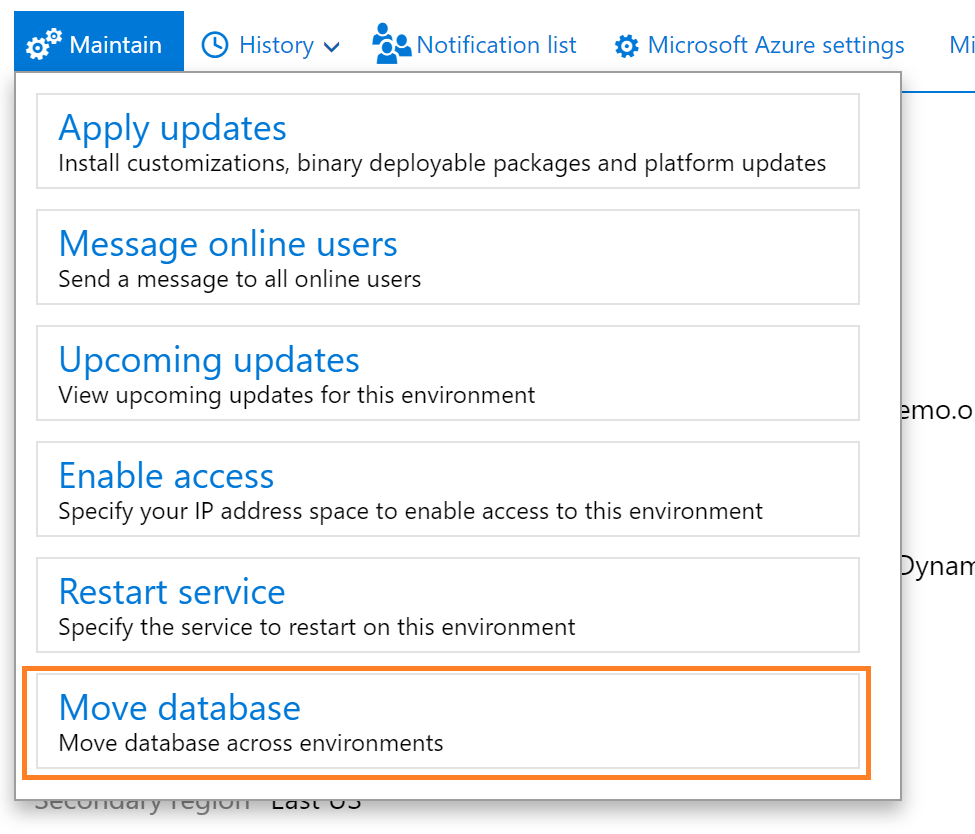
Export a copy of the standard user acceptance testing (UAT) database
Reference link: Export a copy of the standard user acceptance testing (UAT) database - Finance & Operations | Dynamics 365 | Microsoft ...
-
 static void CON_PeriodicJournal_Multiplelines(Args _args) { LedgerJournalTrans ledgerJournalTrans,LedgerJournaltrans1; ...
 -
X++ Code to cancel Sales order static void DMSSOCancel(Args _args) { SalesTable salestable; ...
-
Hi Daxer's !!! I'm very glad to explore my knowledge on Microsoft Dynamics Ax . -- " Gaining knowledge is the first s...