Thursday, July 14, 2016

Tuesday, July 12, 2016
Monday, June 27, 2016
Key Points on DIXF AX 2012 r3
one of the few new key features is
that the DIXF[Data Import Export Framework Changes] runs
on top of the SSIS service interface allowing incremental runs
(UPSERT). Of course, it can import/export data, and Microsoft added the
capability to compare and copy data between instances as well. In
addition, the new DIXF version ships with the ability to choose different data
sources such as text, MS Excel, and XML files.
 Further, the new DIXF can be used to
extract data directly from various ODBC*** sources such as SQL, MS Access, and
MS Excel. This new additions will help us streamline our data migrations and
data transfers much better.
***For ODBC types we are going to have to provide a connection string in order to simplify the data selection process. The one cool thing I saw was that we can create new rows under Mapping Details to add mandatory fields i.e. ACCOUNTNUM in case a specific legacy system does not include it.
When this scenario is true, the custom value provided can be automatically filled by a number sequence value (if we want to) by choosing the “AUTO” option in that specific row, which would take a new AccountNum from the numbering sequence system. However, we can also choose to have default values as in older versions.
In terms of the DIXF entities, the new DIXF ships with a 150 entities in comparison to the 78 (I think) it came with in earlier versions. These include master data, documents, journals, parameters, party, products, and configuration data.
Another cool addition is the addition of folder support. We are going to be able to move stuff around automatically (needs to be pre-defined) to different folders in our domain based on the operations we are executing.
 Role Base Security: Provides a security
framework for the different levels on an organization, this is built on top of
the existing security framework (i.e. Production cannot import HR data).
Mapper Control: Allows flexible mapping between custom entities and staging objects. In addition, mapping effort is reduced when using AX friendly column names (i.e. ITEMID).
Custom Entity Wizard: We can compare data in different companies. This becomes specially interesting and useful to compare parameter data between a gold and test instances for example. When using this tool to import data that contains discrepancies, the system inserts the data into a staging table where it is compared by another process in a specific number of companies and/or instances, and finally it gets updated.
At this point, a user can use the Comparison form to move records between different instances.
***For ODBC types we are going to have to provide a connection string in order to simplify the data selection process. The one cool thing I saw was that we can create new rows under Mapping Details to add mandatory fields i.e. ACCOUNTNUM in case a specific legacy system does not include it.
When this scenario is true, the custom value provided can be automatically filled by a number sequence value (if we want to) by choosing the “AUTO” option in that specific row, which would take a new AccountNum from the numbering sequence system. However, we can also choose to have default values as in older versions.
In terms of the DIXF entities, the new DIXF ships with a 150 entities in comparison to the 78 (I think) it came with in earlier versions. These include master data, documents, journals, parameters, party, products, and configuration data.
Another cool addition is the addition of folder support. We are going to be able to move stuff around automatically (needs to be pre-defined) to different folders in our domain based on the operations we are executing.
Mapper Control: Allows flexible mapping between custom entities and staging objects. In addition, mapping effort is reduced when using AX friendly column names (i.e. ITEMID).
Custom Entity Wizard: We can compare data in different companies. This becomes specially interesting and useful to compare parameter data between a gold and test instances for example. When using this tool to import data that contains discrepancies, the system inserts the data into a staging table where it is compared by another process in a specific number of companies and/or instances, and finally it gets updated.
At this point, a user can use the Comparison form to move records between different instances.
System
Configuration Data: BI-Analysis and Reporting Services, Project Server
Integration, EP, Batch Settings, Number Sequences, Email Parameters, AIF,
System Service Accounts.
DIXF Import Process
The import Process us done by using an abstraction layer that uses SSIS behind the DIXF framework. Within this abstraction layer, we can add possible X++ customizations.
I asked the question on what would be the recommendation for migrating data from legacy systems – the following is what I could get from their recommendation (I was taking notes).There are two types of data migration architecture that consolidate both importing and cleansing data.
The first option is to have a middle tier that can process the data from a legacy system, to an external system and clean it before it goes to Microsoft Dynamics AX.
DIXF Articles Links
http://ax2012dmfdataimport.blogspot.in/
https://ax.help.dynamics.com/en/wiki/data-importexport-framework-user-guide-dixf-dmf/
http://dax2012dmfdataimport.blogspot.in/2012/12/microsoft-dynamics-ax-2012-how-to.html
http://ax2012aifintegration.blogspot.in/2013/05/microsoft-dynamics-ax-2012-data-import.html
http://shafeaa.blogspot.in/p/di.html
Export Link:http://nabeeldotnet.blogspot.in/2015/06/export-data-from-ax-2012-using-dixf.html
Batch Dixf Link:https://kurthatlevik.wordpress.com/2015/08/21/dax2012r3cu9-dixf-automate-importexport-without-customizations/
Newly added features in Ax 2012 R3 http://uk.hitachi-solutions.com/blog/data-migration-microsoft-dynamics-ax-2012-r2-r3/
Custom Entity Link:http://worldofax.blogspot.in/2015/09/creating-custom-entity-through-wizard.html
What's new: Data Import/Export Framework for Microsoft Dynamics AX 2012 [AX 2012]
What's new: Data Import/Export Framework for Microsoft Dynamics AX 2012 [AX 2012]
Referred link :https://technet.microsoft.com/en-us/library/dn507098.aspx
Applies To: Microsoft Dynamics AX 2012 R3, Microsoft Dynamics AX 2012 R2, Microsoft Dynamics AX 2012 Feature Pack, Microsoft Dynamics AX 2012
The Data Import/Export Framework is a feature that helps you export data and import it into Microsoft Dynamics AX. It is included in Microsoft Dynamics AX 2012 R3. Prior to Microsoft Dynamics AX 2012 R3, it was available as a separate download. For more information about Data Import/Export Framework, see Data import/export framework user guide (DIXF, DMF).
Releases
The following sections describe the features that have been added in each release.
Microsoft Dynamics AX 2012 R3
Date: May 2014
This release includes the following features:
- A new security group for the Data Import/Export Framework, Microsoft Dynamics AX Data Import Export Framework Service User.
- Additional entities: Resource requirements, Operations, and Route relation.
- Staging-level validation of data that contains role separators.
- Support for SQL Server 2014.
- Additional data sources when you use Data Import/Export Framework as an Application Integration Framework (AIF) service. These include files, ODBC, and other Microsoft Dynamics AX instances. You can also now use a Data Import/Export Framework as an AIF service to export data to a file.
- Staging-level conversion of fields that use the GUID data type.
- The Custom Entity wizard now creates the class and functions of a new entity, in addition to the staging table, project, and query.
- Error files for data import/export operations are now created in XML instead of in plain text for easier parsing.
- You can now use a role separator in export as well as import operations, to delimit multiple values in the same field.
Cumulative update 7 release
Date: October 2013
This release is available only for cumulative update 7 for Microsoft Dynamics AX 2012 R2.
This release includes the following features:
- Additional entities for configuration, Microsoft Project, Fiscal books, Microsoft Dynamics AX 2012 for Retail
- Support for XML data sources
- Support for Microsoft Excel data sources
- Role-based security for processing groups
- UI for comparing entities across companies
- UI for copying entities across companies
Initial release
Date: March 2013
This release includes the following features:
- 70 out-of-box entities.
- Custom entity creation wizard.
- Support for Microsoft Dynamics AX 2012 RTM, Microsoft Dynamics AX 2012 Feature Pack, and Microsoft Dynamics AX 2012 R2.
- Support for Microsoft SQL Server 2008 and Microsoft SQL Server 2012.
- Import entity data from multiple sources: files (delimited and fixed width) and Open Database Connectivity (ODBC).
- Export entity data from AX 2012 to other AX 2012 environments or files.
- Copy entity data across legal entities.
- Mapping UI.
- Support for parallel execution from staging to target by using several batch task values.
- Use a folder as input for running periodic imports.
- Error handling: Skip rows that contain errors.
- Set-based operations for moving data from staging to target.
- Support for default values.
- Support for number sequences.
- Support for external key mapping.
- Source to target in a single step.
- Support for multiple instances of Microsoft Dynamics AX Application Object Server (AOS).
Friday, June 24, 2016
PreviewParRef property of a table in Ax 2012
PreviewParRef property:
Specifies the Info Part or Form Part to be used in the enhanced preview.
An info part shows a collection of data fields from a specified query. An info part uses metadata to describe how the data appears. A form part represents a pointer to a form.
Hello Daxer's !!!
Today im going to explain clear view of PreviewParRef property of a table with an example
Goto AOT
>>Tables>>smmResponsibilitiesEmplTable
Open
table ,Mouseover on Worker Field it shows an design popup as below screen shot

Worker field is Related to HcmWorker Table, So, I select HcmWorker
Table and observed property of Previewpartref “HcmWorkerEnhancedPreview”
Now Parts>>FormPart>> HcmWorkerEnhancedPreview”,Observe the Form Property “HcmWorkerEnhancedPreviewPart”
Finally Open HcmWorkerEnhancedPreviewPart Form as below
screen shot clearly shows the result

Monday, June 20, 2016
About FormRef Table Property in Ax 2012
What is the use of Form Ref:
Specifies
the display menu item that is activated when a table is referenced. A display
menu item is associated with a form.
When
you use a primary index field on a report, this form is available as a link in
the report. A primary index is specified by using the PrimaryIndex property.
If
you leave this field blank, the system attempts to display a form that has the
same name as the table.
Hi Daxer’s !!!
Today Im gonna to Explore About Table Property of “FormRef”
Create a New Table as Below Screen shot

Create One Related Table For Above Table as below Screen Shot:


Open Table SKP_FormRefEx_B insert values as below screen
shot

Now Right click on id value Select view details as below
screen shot

Warning message appears as below screen shot: it occurs by
the Related field of SkP_FormRefEX_A
i.e SkP_FormRefEX_A table Is not having any FormRef Property
value

Now I use to Keep Form Reference for SkP_FormRefEX_A table
First I need to create one Form As below Screenshot

>>
Create Menu One Display MenuItem for above Form

Now Goto SkP_FormRefEX_A
table & Keep Above Menuitem as FormRef

Goto SkP_FormRefEX_B table, open it Right click
on related field of SkP_FormRefEX_A table and Select View Details as Above process


Finally,FormRef
Property is achieved as above screenshot explains clear view of it !!!
I hope it
may helps some one who are unable to understand
In standard Level Please Observe the Table EcoResProduct Table FormRef Property
Subscribe to:
Posts (Atom)
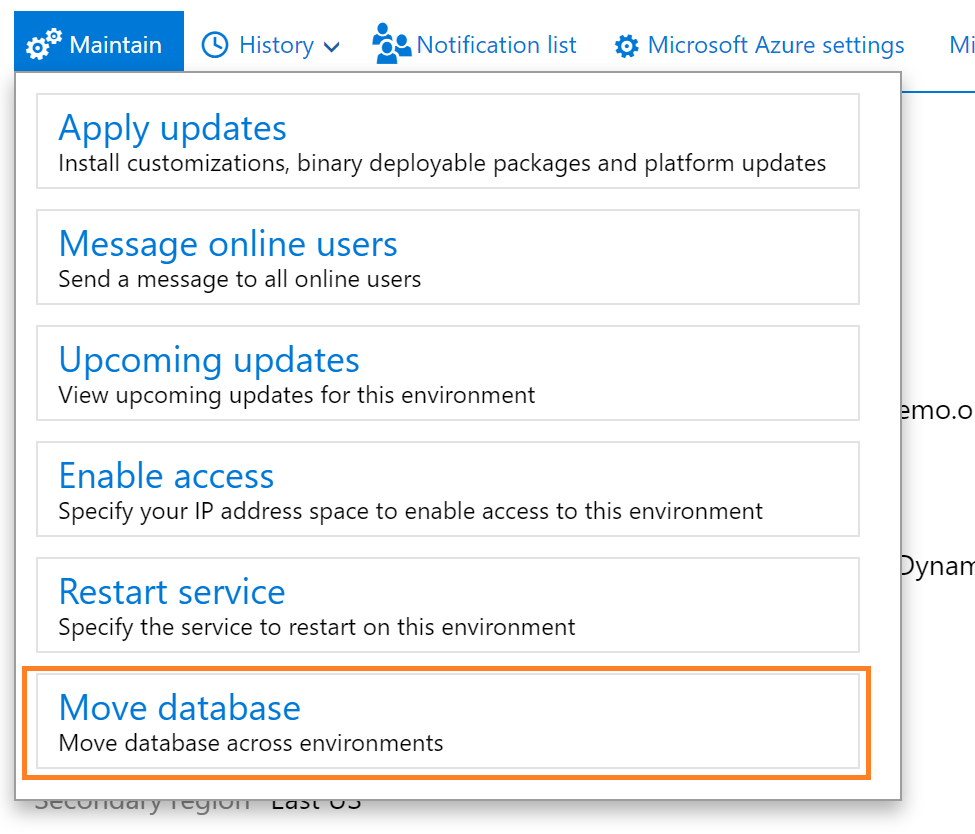
Export a copy of the standard user acceptance testing (UAT) database
Reference link: Export a copy of the standard user acceptance testing (UAT) database - Finance & Operations | Dynamics 365 | Microsoft ...
-
 static void CON_PeriodicJournal_Multiplelines(Args _args) { LedgerJournalTrans ledgerJournalTrans,LedgerJournaltrans1; ...
-
X++ Code to cancel Sales order static void DMSSOCancel(Args _args) { SalesTable salestable; ...
-
Hi Daxer's !!! I'm very glad to explore my knowledge on Microsoft Dynamics Ax . -- " Gaining knowledge is the first s...