Friday, January 22, 2016

Sales Order and Purchase Order Tables and Classes

Sales Order and Purchase Order Tables and Classes


SalesOrder Classes and Tables:

SalesTableType and SaleslineType classes will get called while creating the SalesOrders.
SalesFormLetter_Confirm
SalesFormLetter_Invoice
SalesFormLetter_PackingSlip
SalesFormLetter_PickingLlst
classes will be used to post the sales order at various document status (packing, invoice etc).
Tables:
SalesTable contains all SalesOrder headers regardless whether they have been posted or not.
The SalesParmTable and SalesParmLine contains detailed information regarding posting sales headers and Lines.
CustConfirmJour and CustConfirmTrans tables contains all Sales Confirmation headers and Lines posted in Dynamic Ax originating from Sales Orders and Lines.
CustPackingSlipJour and CustPackingSlipTrans tables contains all sales PackingSlip headers and Lines posted in Dynamic Ax originating from Sales Orders and Lines.
CustInvoiceJour and CustInvoiceTrans tables contains all sales all Sales Invoice headers and Lines posted in Dynamic Ax originating from Sales Orders and Lines.

Purchase Order classes and Tables:

PurchTableType and PurchTableLine classes will get called while creating the PurchaseOrders.
PurchFormLetter_PurchOrder
PurchFormLetter_ApproveJournal
PurchFormLetter_Invoice
PurchFormLetter_PackingSlip
PurchFormLetter_ReceiptsList
classes will be used to post the PurchaseOrder at various document status (packing, invoice etc).
Tables:
PurchTable contains all purchase order headers regardless whether they have been posted or not.
PurchParmTable and PurchParmLine contains detailed information regarding posting Purchase headers and Lines.
VendPurchOrderJour and VendPurchOrderTrans tables contains Purchase requisition headers and lines.(i.e purchase confirmation details.)
VendReceiptsListJour contains Posted purchase receipt headers.
VendReceiptsListPurchLink contains purchase receipt relations.
VendReceiptsListTrans contains  Posted purchase receipt Lines.
VendReceiptsJour and VendReceiptsTrans tables contains posted receipt header and lines.
VendPackingSlipJour and VendPackingSlipTrans tables contains posted packingslip headers and lines.
VendInvoiceJour and VendInvoiceTrans tables contains all invoiced purchase order headers and Lines.

VendInvoiceInfoTable and VendInvoiceInfoLine tables contains Vendor invoice headers and lines for specific purchase order.


As per my observation through debugging:
FormletterService class will be triggered for when updating sales orders, purchase orders from FormletterServiceController Class.

FormletterService 
Methods:
Purchase Order posting methods:
postPurchaseOrderConfirmation :Posts a purchase order confirmation.
postPurchaseOrderReceiptList:Posts a purchase order receipt list.
postPurchaseOrderPackingSlip: Posts a purchase order packing slip.
postPurchaseOrderInvoice:Posts a purchase order invoice.

SalesOrder posting methods:
postSalesOrderConfirmation:Posts a sales order confirmation.
postSalesOrderPickingList:Posts a sales order picking list.
postSalesOrderPackingSlip:Posts a sales order packing slip.
postSalesOrderInvoice:Posts a sales order invoice.


Happy Daxing !!!


Thursday, January 21, 2016

Creating SO and PO with X++ code in ax 2012 r3

Creating SO with X++ code in ax 2012 r3

static void SO_shiv(Args _args)
{
    NumberSeq numberSeq;
    SalesTable salesTable;
    SalesLine salesline;
    SalesFormLetter salesFormLetter;
    ;
    ttsBegin;
    numberSeq = NumberSeq::newGetNum(SalesParameters::numRefSalesId());
    numberSeq.used();
    salesTable.SalesId = numberSeq.num(); // salestable
    salesTable.initValue();

    salesTable.CustAccount='US-002';
    salesTable.initFromCustTable();
    salesTable.insert();

    salesline.SalesId = salesTable.SalesId; // saleline
    salesline.ItemId  = "sunglasses";
    salesline.createLine(true,true,true,true,true);
    ttsCommit;

    info(strFmt("%1 SO is created",salesTable.SalesId));//SO Created

    salesFormLetter = SalesFormLetter::construct(DocumentStatus::Confirmation);//SO Confirmed
    salesFormLetter.update(salesTable);
    info(strFmt("%1 SO is Confirmed",salesTable.SalesId));

    salesFormLetter = SalesFormLetter::construct(DocumentStatus::Invoice);//SO Invoiced
    salesFormLetter.update(salesTable);
    info(strFmt("%1 SO is Invoiced ",salesTable.SalesId));

}


//Creating PO with X++ code in ax 2012 r3

static void PO_shiv(Args _args)
{
    NumberSeq numberseq;
    PurchTable purchtable;
    PurchLine purchline;
    PurchFormLetter purchformletter;

    ;
    ttsbegin;
    numberseq = NumberSeq::newGetNum(PurchParameters::numRefPurchId());
    numberseq.used();
    purchtable.PurchId = numberseq.num();
    purchtable.initValue();

    purchtable.initFromVendTable(VendTable::find('1100'));


    if(!purchtable.validateWrite())
    {
        throw exception::Error;
    }
    purchtable.insert();


    purchline.PurchId=purchtable.PurchId;
    purchline.ItemId ='Duke Bike 700';
    purchline.createLine(true,true,true,true,true,true);
    ttsCommit;
    info(strFmt("%1 Purchase order is created ",purchtable.PurchId));//Po created

    purchFormLetter = PurchFormLetter::construct(DocumentStatus::PurchaseOrder);// PO confirm
    purchformLetter.update(purchtable,Purchtable.PurchId);
    info(strFmt("%1 PO is Confirmed ",purchtable.PurchId));


    purchformletter = PurchFormLetter::construct(DocumentStatus::ReceiptsList);// Receipt List
    purchformletter.update(purchtable,purchtable.PurchId);
    info(strFmt("%1 PO ReciptList created  ",purchtable.PurchId));

    purchformletter = PurchFormLetter::construct(DocumentStatus::Invoice);// PO Invoiced
    purchformletter.update(purchtable,purchtable.PurchId);//here PO no default as Invoice no is taken
    info(strFmt("%1 PO is invoiced",purchtable.PurchId));

    //Note Please Make Sure that the item should have default,purch,sales,inventory site and warehouse settings
    //(i.e go to item edit >manage inventory>defaultordersettings,site order settings)
}

Tuesday, December 29, 2015

How to create Full Text Index in Dynamics AX 2012 with Example

How to create Full Text Index in Dynamics AX 2012 with Example

Full text index supports to quickly query words that are embedded in the middle of a string field of a table. Well, this is a very nice enhancement to query on Database table fields for the developers who work with the latest vesion [Microsoft Dynamics AX 2012]
Good thing is we can use this Index on Memo fields and also Extended data type.
Let me explain with an example. Create a new table as shown below and add a new field of type string “Name” to it – On the field use EDT – Name. In the below example, my table Name is FullTextIndexTextTable.
Once you are done with your table, Go to FullTextIndex Node >> Right click and create a new FullTextIndex.
Rename it to JkFullTextIdx. Drag and drop Name field from the fields to the newly created index.
The table with index should look like below.
 FulltextindexTable
Here I’ve created a input string edit control  ( for user input ) and  a submit button.
CODE:
This is a code in form
public class FormRun extends ObjectRun
{
QueryBuildRange qbr;
str localValue;
}
This code is in Form Datasource override mehtod executeQuery()
public void executeQuery()
{
localValue = NameInput.valueStr();
if(localValue)
{
qbr = SysQuery::findOrCreateRange(FullTextIndexTextTable_ds.queryBuildDataSource(),fieldnum(FullTextIndexTextTable, Name));
qbr.rangeType(QueryRangeType::FullText);
qbr.value(localValue);
}
super();
}
This code in Button Clicked() override method
void clicked()
{
super();
FullTextIndexTextTable_ds.executeQuery();
}
Output:
fulltextindexOP

How to create Full Text Index in Dynamics AX 2012 with Example

How to create Full Text Index in Dynamics AX 2012 with Example

Full text index supports to quickly query words that are embedded in the middle of a string field of a table. Well, this is a very nice enhancement to query on Database table fields for the developers who work with the latest vesion [Microsoft Dynamics AX 2012]
Good thing is we can use this Index on Memo fields and also Extended data type.
Let me explain with an example. Create a new table as shown below and add a new field of type string “Name” to it – On the field use EDT – Name. In the below example, my table Name is FullTextIndexTextTable.
Once you are done with your table, Go to FullTextIndex Node >> Right click and create a new FullTextIndex.
Rename it to JkFullTextIdx. Drag and drop Name field from the fields to the newly created index.
The table with index should look like below.
 FulltextindexTable
Here I’ve created a input string edit control  ( for user input ) and  a submit button.
CODE:
This is a code in form
public class FormRun extends ObjectRun
{
QueryBuildRange qbr;
str localValue;
}
This code is in Form Datasource override mehtod executeQuery()
public void executeQuery()
{
localValue = NameInput.valueStr();
if(localValue)
{
qbr = SysQuery::findOrCreateRange(FullTextIndexTextTable_ds.queryBuildDataSource(),fieldnum(FullTextIndexTextTable, Name));
qbr.rangeType(QueryRangeType::FullText);
qbr.value(localValue);
}
super();
}
This code in Button Clicked() override method
void clicked()
{
super();
FullTextIndexTextTable_ds.executeQuery();
}
Output:
fulltextindexOP

Filter and Sort the records of Grid in Ax 2012 with Example


Filter and Sort the records of Grid in Ax 2012 with Example


My Table:Bill_TableData
I have a table named Bill_TabMethod with many fields. But I’am using two fields to filter. one is the name of the customer and another one is the name of the item which is purchased by the customer. Now iam going to filter the records by Customer Name as well as Item name specified by the user. for that i am using one string edit control, one button and one radio button control/
Second thing is for Sorting, for sorting i took one radio button with two items like Ascending and Descending.
CODE:
This is under form
public class FormRun extends ObjectRun
{
QueryBuildRange custname;
QueryBuildRange itemname;
}
Write this code under Datasource init() method
public void init()
{
super();
custname=this.query().dataSourceNo(1).addRange(fieldNum(Bill_TabMethod,CustName));
itemname=this.query().dataSourceNo(1).addRange(fieldNum(Bill_TabMethod,ItemName));
}
Write this code under datasource executeQuery() method
public void executeQuery()
{
if(FilterString.valueStr())
{
if(ChoiceButton.valueStr()==”CustName”)
custname.value(FilterString.valueStr());
else if(ChoiceButton.valueStr()==”ItemName”)
itemname.value(FilterString.valueStr());
}
super();
}
This is under Radiobutton Selection change Override Method
public int selectionChange()
{
int ret;
ret = super();
if(SortButton.valueStr()==”Ascending”)
{
Bill_TabMethod_ds.query().dataSourceNo(1).sortClear();
Bill_TabMethod_ds.query().dataSourceNo(1).addSortField(fieldNum(Bill_TabMethod,CustName),SortOrder::Ascending);
}
else if(SortButton.valueStr()==”Descending”)
{
Bill_TabMethod_ds.query().dataSourceNo(1).sortClear();
Bill_TabMethod_ds.query().dataSourceNo(1).addSortField(fieldNum(Bill_TabMethod,CustName),SortOrder::Descending);
}
SubmitButton.clicked();
return ret;
}
This is under Button Clicked Override method
void clicked()
{
super();
Bill_TabMethod_ds.executeQuery();
}
OUTPUTS:
Filter by Item name                                              
         
filterbyitemname

Filter by Customer Name

 filterbycustname
Sort by Descending                                                    
      
Descending

Sort by Ascending

 Ascending

Example for Table Methods in Ax 2012


Example for Table Methods in Ax 2012


My Table is:
Bill_TableData
I did Two methods Init value, ValidateField.
CODE:
For Init value Method:  Here iam initializing a default value to all new records which is going to create.
public void initValue()
{
super();
this.Vat=14;
}
For Validate Field Method: Here iam restricting each filed by some condition
public boolean validateField(FieldId _fieldIdToCheck)
{
boolean ret;
ret = super(_fieldIdToCheck);
if(ret)
{
switch(_fieldIdToCheck)
{
case fieldNum(Bill_TabMethod,Quatity):
if(this.Quatity <5)
{
error(“Should give more than FIVE”);
this.Quatity=0;
}
break;
case fieldNum(Bill_TabMethod,Price):
break;
case fieldNum(Bill_TabMethod,Discount):
if(this.Discount>45)
{
this.Discount=0;
error(“Discount Should be Less than 45”);
}
break;
}
}
this.TotalAmt=(this.Quatity * this.Price);//-this.Discount;
this.TotalAmt=this.TotalAmt-this.TotalAmt*(this.Discount/100);
this.NetAmt=this.TotalAmt+this.TotalAmt* (this.Vat/100);
return ret;
}
This is the Output Error while checking the condition on Discount Percentage.
TabMethodError

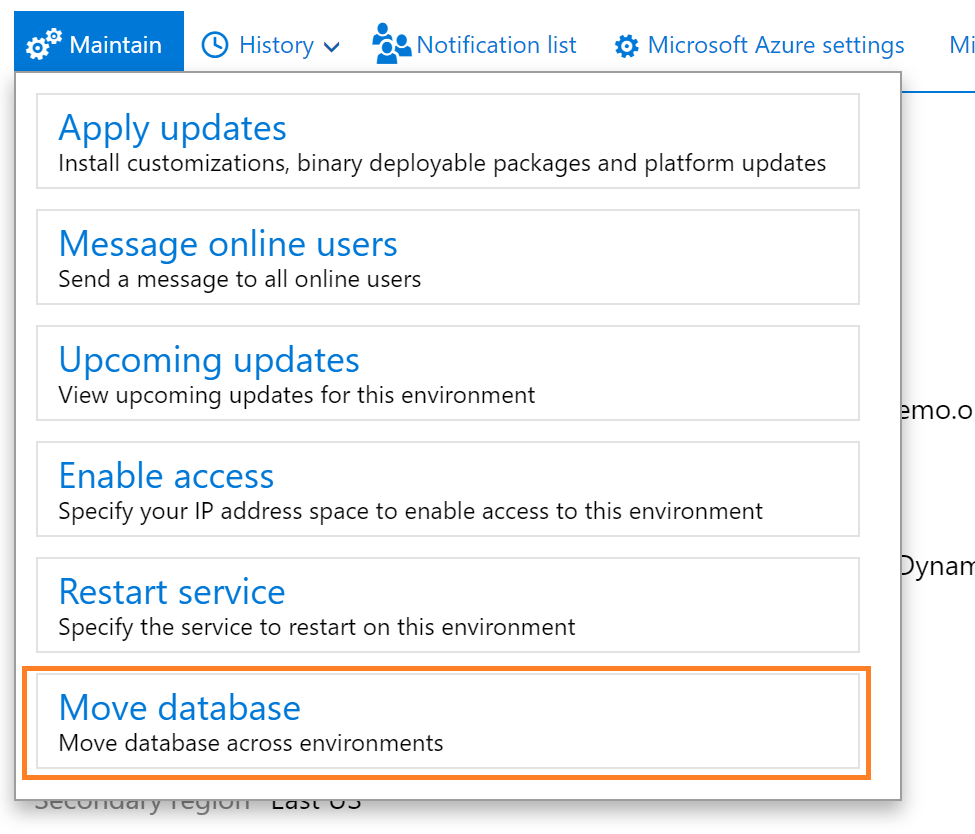
Export a copy of the standard user acceptance testing (UAT) database

 Reference link: Export a copy of the standard user acceptance testing (UAT) database - Finance & Operations | Dynamics 365 | Microsoft ...